As a valued partner, the CSM team provides consistent support for key home officecontacts to ensure success and satisfaction.
The team champions operational and technical production issues to allow the home office to spend less time tracking details and more time serving their clients.
The CSM team serves as the home office point of contact for production related issues, so the home office always knows who to contact for escalations.
The team works collaboratively with internal teams on behalf of the client to manage cases – all while keeping them informed of the progress along the way.
eMoney’s data migration services provide expert setup and maintenance of Advisor’s clients on the eMoney system. Our highly skilled specialists enter client data* in a secure work environment so the advisor can focus on what they do best – connecting with clients and building their business.
How the team can help advisors
Using systematic tools, the team migrates the advisor’s client data between eMoney installs.*
Manually add or update client information in the application, including income, expenses, liabilities, property, investments, insurance, and more.*
* There is a fee for these services.
Benefits for the advisors
Optimize the client entry process.
Onboard clients more quickly and increase speed of adoption.
Increase client retention.
Scale their practice more effectively.
It’s easy. It’s secure. And it helps advisors save time and serve their clients more efficiently.
eLearning
The eLearning Team builds and maintains the eMoney platform online help, such as user guides, videos, how-to navigational walk throughs, pop-ups, and interactive guides.
The team also builds and maintains interactive, self-paced coursework that users can take at their own pace, prior to a training or coaching session, or as a refresher.
Quizzes and assessments are available throughout the courses to test the user’s skill level and content comprehension.
More information about using Help and the Knowledge Base can be found here.
Coaching
The Coaching team conducts personal coaching sessions for advisors. The Coach helps to expand the advisor’s knowledge and skills of the eMoney platform, allowing them to fully implement eMoney into the practice!
The coaching team is responsible for onboarding our new (and upgraded) users.
The team uses Outreach to schedule calls and Gong to record calls.
Call monitoring tools allow the Coaches and Managers to review calls for quality and training purposes.
The coaching sessions are part of the Getting Started Program (GSP).
The Coaching team and Training team provide GSP ‘core concept’ sessions that include the following topics:
Coaching GSP
Training GSP
– Getting Started – Optimizing Aggregation – Rolling Out Your Client Portal to Market – Building & Presenting a Plan
– Navigating eMoney – Entering Data – Troubleshooting Reports & Creating Presentations – Initializing Your Client Experience – Build a Plan Using Advanced Planning – Presenting with Goal Planner – Build Your Knowledge of Decision Center – Creating a Simple Plan
These sessions are now provided via recorded webinar.
Client Training
Training Team
Current eMoney users can find more information about training in the eMoney application located under Training in the blue navigation bar.
Our expert trainers build and manage user training programs for advisors and users ranging from beginner to intermediate to advanced. The team provides standard and custom training, both virtual and in person.
Live and recorded sessions that include: – GSP Core Concepts (on demand) – Intermediate Series (daily) – Advanced Series (bi-weekly) – Impactful Extras (bi-weekly) – Product Updates (monthly) – Bamboo (on demand recording)
Firm specific training that is defined during the contract process may include: – Home Office Training – Train-the-Trainer Programs – Configuration Training
Custom Training Services: Custom training is offered to firms looking for a more personalized training. The Trainer and firm partner to design the custom agenda that is tailored to the firm’s business and learning objectives.
Client Service Operations
The Client Service Ops team manages a portfolio of initiatives to ensure successful and on-time delivery of all Client Service projects working with other teams across the organization to ensure continuous process improvement to achieve results.
The team is responsible to understand the tools usedby the team to ensure efficiency, scale, and optimization.
The team leads, managers, and delivers all Client Service projects and technology improvements, such as workflow and process improvements.
The team focuses on reporting, data analysis, and technology optimization.
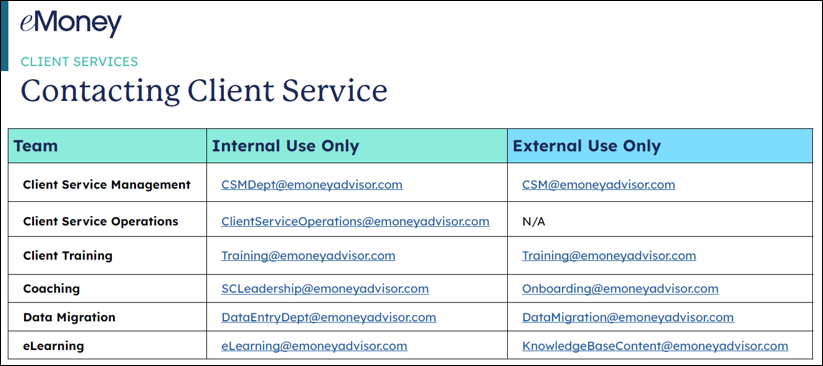
Contacting Client Service
The information below is intended to help put our internal and external partners in touch with the right person or team whenneeded.
IMPORTANT NOTES:
All external-facing email addresses should ONLY be used when a Salesforce case needs to be created.
Internal teams should ONLY use the external email address when a Salesforce case is needed.
For questions that do not require a case, please use the internal email addresses listed below. Click the image to open a clickable PDF.